

Choosing the right ERP software can cost your business anywhere from ₹20 lakhs to ₹2 crores for enterprise solutions like SAP or Oracle. But what if there was a powerful, feature-rich alternative that’s completely free? Enter ERPNext—the world’s most popular open-source ERP software that’s transforming how businesses manage their operations without breaking the bank.
Whether you’re a small manufacturer in Pune, a growing healthcare provider in Delhi, or a mid-sized distributor in Bangalore, ERPNext offers enterprise-level features without enterprise-level costs. This comprehensive guide covers everything you need to know about ERPNext software: what it is, how it works, what it costs (really), and whether it’s the right fit for your business.
With the recent ERPNext Version 16 release notes showing major improvements in performance, UI, and features, there’s never been a better time to explore this powerful ERP solution.
What is ERPNext Software?
ERPNext is a 100% free, open-source Enterprise Resource Planning (ERP) software that helps businesses manage their entire operations from a single platform. Built on the Frappe Framework v16, ERPNext integrates accounting, inventory, sales, purchasing, manufacturing, HR, project management, and more into one unified system.
Brief History
Founded in 2008 by Rushabh Mehta in Mumbai, India, ERPNext was created to provide businesses with an affordable alternative to expensive proprietary ERP systems. What started as a simple accounting tool has evolved into a comprehensive business management platform used by over 10,000 companies across 100+ countries.
Open Source Explained
ERPNext is released under the GNU General Public License v3 (GPL v3), which means:
- Free to download and use – No license fees, ever
- Full source code access – Modify and customize as needed
- No vendor lock-in – You own your data and can host anywhere
- Active community – Thousands of developers contributing improvements
- Transparent development – All code is publicly available on the ERPNext GitHub repository
Who Uses ERPNext?
ERPNext serves businesses of all sizes across diverse industries:
- Small businesses (10-50 employees) – Cost-effective alternative to Tally or QuickBooks
- Mid-sized companies (50-500 employees) – Scalable solution without SAP/Oracle costs
- Manufacturing units – Production planning, BOM management, quality control
- Healthcare providers – Hospital management, patient records, pharmacy
- Educational institutions – Student management, fee collection, academics
- Distribution companies – Multi-warehouse inventory, logistics, sales
- Service businesses – Project management, timesheet tracking, billing
ERPNext Core Features
Financial Accounting & Management
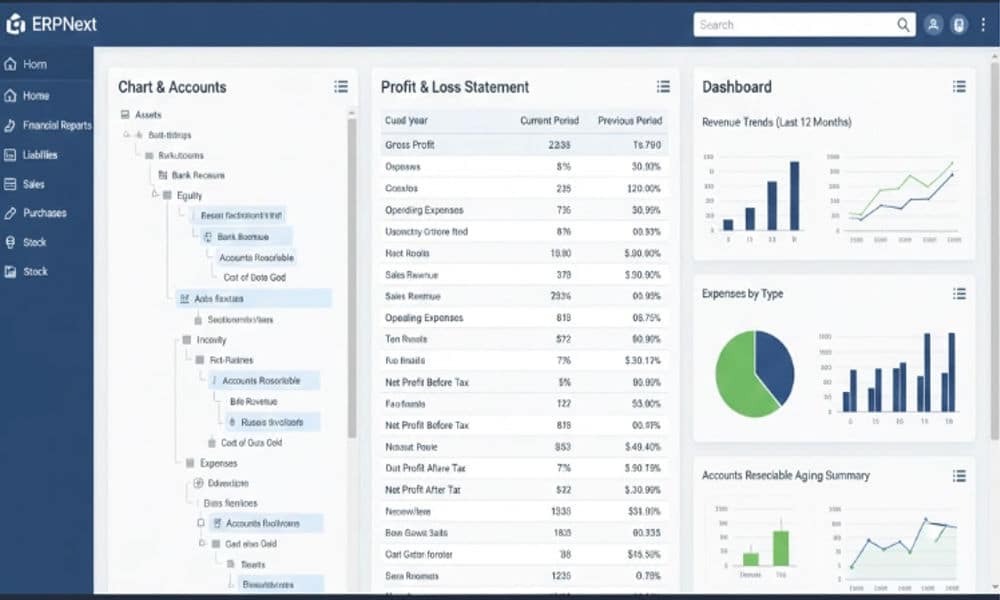
ERPNext provides comprehensive accounting capabilities that rival expensive solutions:
Chart of Accounts
- Multi-level account hierarchy
- Customizable account structure
- Multiple companies in single installation
- Cost center and profit center tracking
Financial Reporting
- Profit & Loss statements
- Balance sheets
- Cash flow statements
- General ledger reports
- Trial balance
- Accounts receivable/payable aging
Banking & Payments
- Bank reconciliation
- Payment entry and tracking
- Multi-currency support
- Automated bank statement import
- Payment gateway integration
Taxation & Compliance
- GST-ready with GSTR reports
- TDS/TCS management
- Tax withholding and filing
- Audit trail and compliance reports
Inventory & Stock Management
Powerful inventory features for businesses with complex stock requirements:
Warehouse Management
- Multi-warehouse support
- Stock transfer between warehouses
- Batch and serial number tracking
- Stock reconciliation
- Warehouse-wise stock reports
Item Management
- Unlimited item variants
- Item groups and categories
- Barcode generation and scanning
- Item pricing rules
- Reorder level alerts
Stock Movements
- Stock entry (receipt, issue, transfer)
- Material request management
- Stock reservation
- Landed cost calculation
- Stock aging analysis
Sales & CRM
Complete sales cycle management from lead to payment:
Lead & Opportunity Management
- Lead capture and qualification
- Opportunity tracking
- Sales pipeline visualization
- Lead source analysis
- Automated follow-up reminders
Sales Process
- Quotation creation
- Sales order management
- Delivery note generation
- Sales invoice with payment tracking
- Customer portal for order tracking
Customer Management
- Customer database with contact details
- Customer groups and territories
- Credit limit management
- Customer loyalty programs
- Sales analytics by customer
Purchase & Procurement
Streamline your procurement process:
Supplier Management
- Supplier database with ratings
- Supplier quotation comparison
- Approved supplier lists
- Supplier performance tracking
Purchase Workflow
- Material request from departments
- Request for quotation (RFQ)
- Purchase order creation
- Purchase receipt
- Purchase invoice with matching
Procurement Analytics
- Purchase analytics by supplier
- Item-wise purchase history
- Purchase order tracking
- Supplier payment tracking
Manufacturing & Production
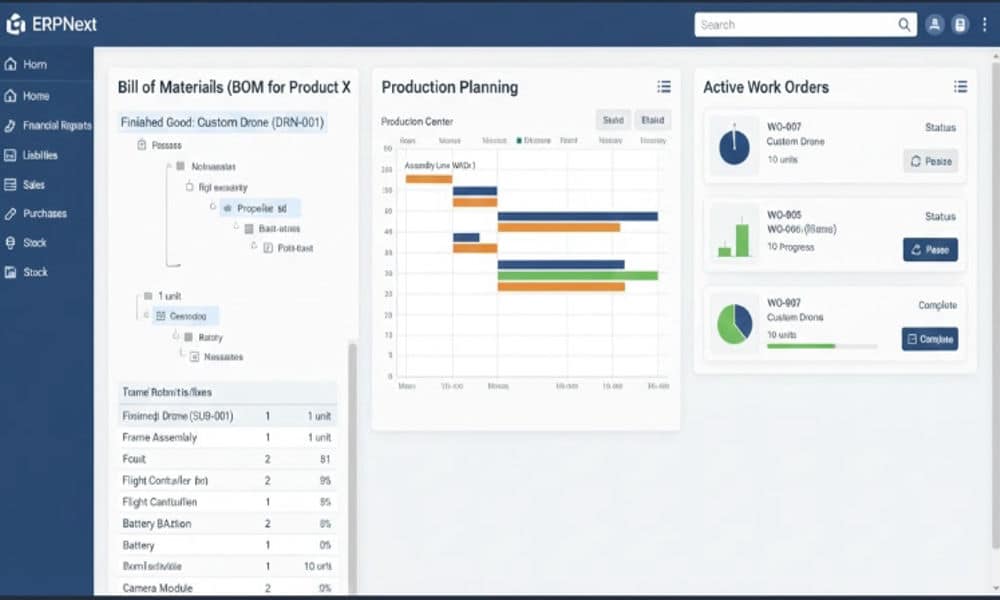
Industry-leading manufacturing features:
Bill of Materials (BOM)
- Multi-level BOM structure
- BOM versioning and comparison
- Component substitution
- Scrap management
- BOM cost calculation
Production Planning
- Work order creation and tracking
- Production planning tool
- Material requirement planning (MRP)
- Capacity planning
- Production scheduling
Shop Floor Management
- Job card for operations
- Time and material tracking
- Quality inspection
- Downtime tracking
- Production analytics
Subcontracting
- Subcontracting order management
- Material transfer to subcontractor
- Finished goods receipt
- Subcontracting cost tracking
Human Resources & Payroll
Complete HR management system:
Employee Management
- Employee master data
- Department and designation structure
- Employee lifecycle management
- Document management
- Employee self-service portal
Attendance & Leave
- Biometric integration
- Shift management
- Leave application and approval
- Leave encashment
- Attendance reports
Payroll Processing
- Salary structure definition
- Automated salary slip generation
- Tax calculation (TDS)
- Payroll journal entry
- Salary register and reports
Recruitment
- Job opening management
- Job applicant tracking
- Interview scheduling
- Offer letter generation
Project Management
Comprehensive project tracking:
Project Planning
- Project creation with milestones
- Task assignment and tracking
- Gantt chart visualization
- Project templates
- Resource allocation
Time Tracking
- Timesheet entry by employees
- Billable vs non-billable hours
- Project-wise time analysis
- Timesheet approval workflow
Project Costing
- Budget vs actual tracking
- Project profitability analysis
- Expense tracking
- Project invoicing
Asset Management
Track and manage company assets:
- Asset master with depreciation
- Asset movement tracking
- Asset maintenance scheduling
- Asset value adjustment
- Depreciation posting
- Asset disposal management
All ERPNext Modules Explained
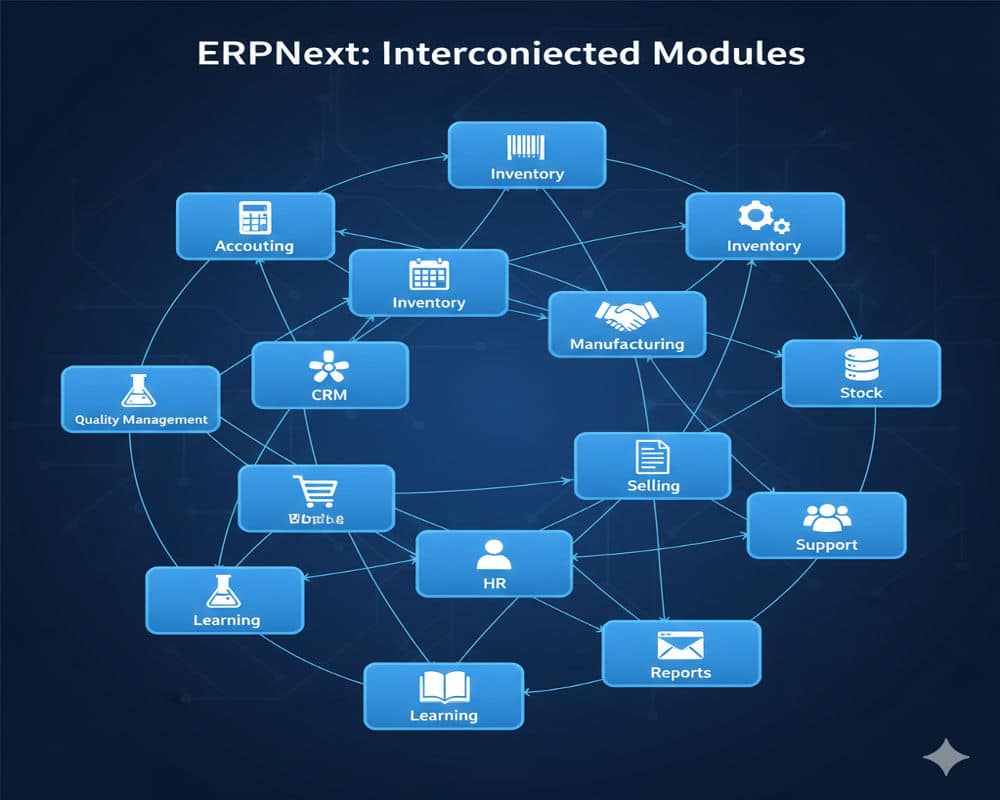
ERPNext includes 15+ integrated modules covering every business function:
Core Modules
- Accounting – Complete financial management
- Stock – Inventory and warehouse management
- Selling – Sales cycle from lead to payment
- Buying – Purchase and procurement
- Manufacturing – Production planning and execution
- Human Resources – Employee and payroll management
- Projects – Project planning and tracking
- Assets – Fixed asset management
Supporting Modules
- CRM – Customer relationship management
- Support – Customer support ticket system
- Quality – Quality management system
- Website – Website builder and content management
- E-commerce – Online store integration
- Healthcare – Hospital and clinic management
- Education – School and university management
- Agriculture – Farming and crop management
- Non Profit – NGO and donor management
- Loan Management – Lending and loan tracking
Optional Modules
- Maintenance – Equipment maintenance scheduling
- Fleet Management – Vehicle tracking and maintenance
- Restaurant – POS and kitchen management
- Hospitality – Hotel booking and management
ERPNext Pricing: Is It Really Free?
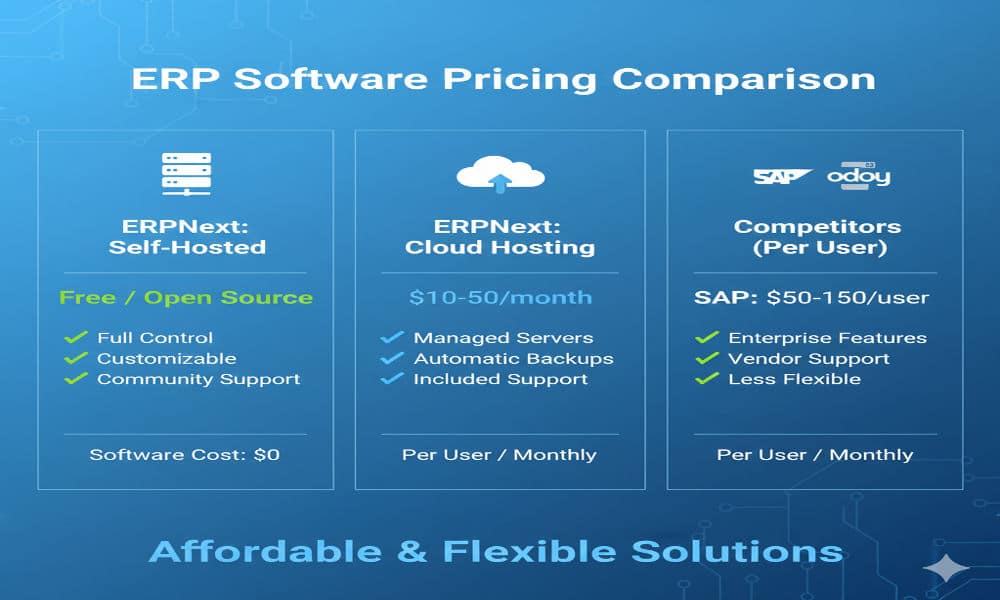
The short answer: Yes, ERPNext is 100% free. But “free” doesn’t mean zero cost. Here’s the complete breakdown:
Open Source License (₹0)
- Software license: FREE
- All features included: FREE
- Source code access: FREE
- Updates and upgrades: FREE
- No per-user fees: FREE
- No module restrictions: FREE
Self-Hosting Costs (₹5,000-50,000/year)
If you host ERPNext on your own server:
Server/Cloud Hosting
- Small business (10-20 users): ₹5,000-15,000/year
- Medium business (50-100 users): ₹20,000-40,000/year
- Large business (200+ users): ₹50,000-1,00,000/year
Technical Requirements
- Linux server (Ubuntu recommended)
- 4GB RAM minimum (8GB+ recommended)
- 40GB storage minimum
- SSL certificate for security
Maintenance
- Server management
- Backup management
- Security updates
- Performance monitoring
Cloud Hosting Pricing (₹800-4,000/user/year)
Frappe Cloud pricing (official hosting):
- Starter: $10/month (~₹800/month) – 2 users
- Standard: $25/month (~₹2,000/month) – 5 users
- Professional: $50/month (~₹4,000/month) – Unlimited users
- Enterprise: Custom pricing for large deployments
Third-Party Hosting
- Various providers offer ERPNext hosting
- Prices range from ₹500-3,000/user/month
- Includes server management and backups
Implementation Costs (₹2-60 lakh)
Professional implementation services vary by complexity:
Basic Setup (₹2-6 lakh)
- Standard ERPNext installation
- Basic configuration
- Data migration from Excel/Tally
- User training (2-3 sessions)
- Timeline: 2-3 months
Professional Implementation (₹10-25 lakh)
- Industry-specific customization
- Custom reports and workflows
- Third-party integrations
- Comprehensive training
- Timeline: 3-5 months
Enterprise Implementation (₹30-60 lakh)
- Extensive customizations
- Multiple custom apps
- Complex integrations
- Multi-location setup
- Change management support
- Timeline: 6-9 months
Hidden Costs to Consider
Training & Change Management
- User adoption programs
- Department-specific training
- Super user certification
- Ongoing training for new employees
Customization & Development
- Custom fields and forms
- Custom reports
- Workflow automation
- Integration development
Support & Maintenance
- Annual Maintenance Contract (AMC): 15-20% of implementation cost
- On-demand support
- System optimization
- Feature enhancements
Total Cost of Ownership (3 Years)
| Business Size | Self-Hosted | Cloud Hosted | With Implementation |
| Small (10-20 users) | ₹50,000 | ₹3-5 lakh | ₹5-10 lakh |
| Medium (50-100 users) | ₹1.5-2 lakh | ₹8-12 lakh | ₹15-30 lakh |
| Large (200+ users) | ₹3-5 lakh | ₹20-30 lakh | ₹40-80 lakh |
Compare this to SAP Business One (₹50-150 lakh) or Oracle NetSuite (₹30-100 lakh) for similar user counts.
ERPNext vs Other ERP Software
ERPNext vs Odoo
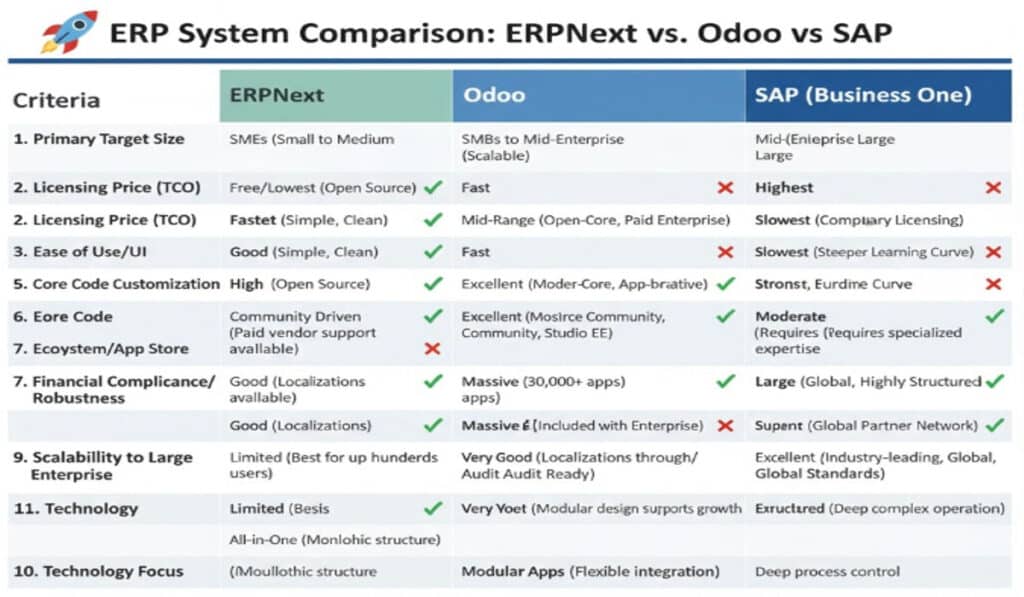
Both are popular open-source ERP systems, but with key differences:
| Feature | ERPNext | Odoo |
| License | 100% free (GPL v3) | Community free, Enterprise paid |
| Pricing | All features free | Most features require Enterprise ($20-40/user/month) |
| Customization | Easier with Python/JavaScript | More complex, requires Odoo framework knowledge |
| User Interface | Clean, modern, intuitive | Feature-rich but can be cluttered |
| Manufacturing | Excellent, built-in MRP | Good, but advanced features in Enterprise only |
| Community | Smaller but very active | Larger community, more apps |
| Documentation | Excellent, comprehensive | Good but scattered |
| Best For | Businesses wanting truly free ERP | Businesses willing to pay for apps |
Verdict: ERPNext wins on cost and simplicity. Odoo wins on app ecosystem. For a detailed analysis, read our ERPNext vs Odoo comparison.
ERPNext vs SAP Business One
SAP is the enterprise standard, but at a premium price:
| Feature | ERPNext | SAP Business One |
| License Cost | ₹0 | ₹2-4 lakh/user (one-time) |
| Implementation | ₹2-60 lakh | ₹30-150 lakh |
| Annual Maintenance | ₹2-10 lakh | ₹8-30 lakh (18% of license) |
| Customization | Easy, affordable | Expensive, requires SAP consultants |
| Scalability | Good (up to 500 users) | Excellent (enterprise-grade) |
| Industry Focus | General, adaptable | Deep industry solutions |
| Support | Community + partners | Enterprise-grade SAP support |
| Best For | SMBs, cost-conscious | Large enterprises, deep pockets |
Verdict: SAP offers enterprise features and support, but at 5-10x the cost. ERPNext provides 80% of SAP’s functionality at 10-20% of the cost.
ERPNext vs Tally
Tally is popular in India for accounting, but limited in scope:
| Feature | ERPNext | Tally |
| Scope | Complete ERP (15+ modules) | Primarily accounting |
| License | Free | ₹18,000-54,000/year |
| Manufacturing | Full MRP, BOM, production | None |
| CRM | Built-in lead & opportunity | None |
| HR & Payroll | Complete HRMS | Basic payroll |
| Multi-location | Unlimited warehouses | Limited |
| Cloud Access | Native cloud support | TallyPrime Server required |
| Customization | Highly customizable | Limited |
| Best For | Growing businesses needing ERP | Small businesses, accounting only |
Verdict: Tally is simpler for basic accounting. ERPNext is a complete business management solution for growing companies.
Who Should Use ERPNext?
Ideal Business Sizes
Perfect Fit (10-500 employees)
- Small manufacturers (10-50 employees)
- Mid-sized distributors (50-200 employees)
- Growing service businesses (20-100 employees)
- Healthcare providers (clinics to 200-bed hospitals)
- Educational institutions (schools to universities)
Can Work (500-1000 employees)
- Requires strong technical team
- May need performance optimization
- Consider enterprise support
Not Ideal (1000+ employees)
- Consider SAP, Oracle, or Microsoft Dynamics
- ERPNext may lack enterprise-scale features
- Support ecosystem not as mature
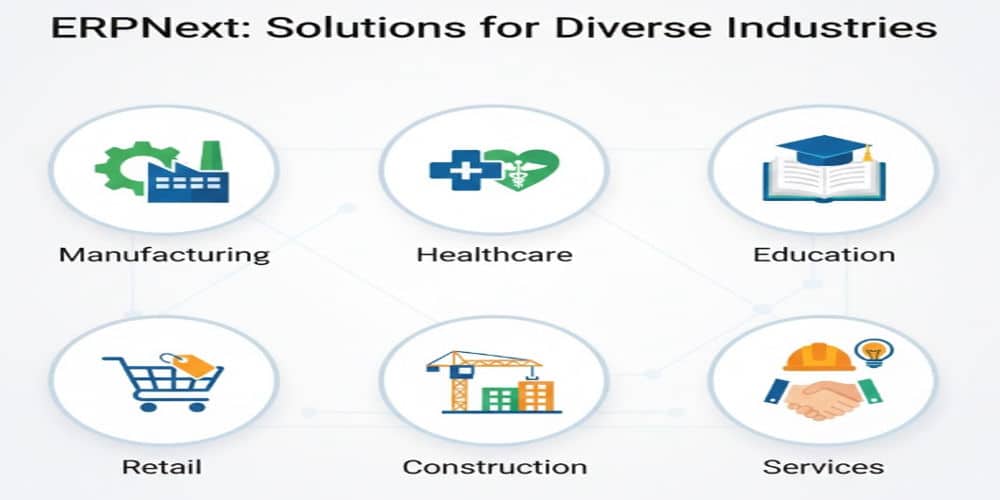
Best Industries for ERPNext
Excellent Fit:
- Manufacturing – BOM, production planning, quality control
- Distribution & Wholesale – Multi-warehouse, batch tracking
- Healthcare – Patient management, pharmacy, lab
- Education – Student management, fee collection, academics
- Retail – POS, inventory, e-commerce integration
- Professional Services – Project management, time tracking, billing
- Construction – Project costing, material management
- NBFC – Loan management, repayment tracking
Good Fit (with customization):
- Hospitality (hotels, restaurants)
- Agriculture and farming
- Non-profit organizations
- IT services companies
Not Recommended:
- Highly regulated industries with specific compliance (banking, insurance)
- Businesses requiring industry-specific certifications
- Companies needing deep industry-specific features (oil & gas, utilities)
When NOT to Use ERPNext
Don’t choose ERPNext if:
- You need plug-and-play – ERPNext requires configuration and training
- You have no technical resources – Some technical knowledge needed for maintenance
- You need 24/7 enterprise support – Community support is excellent but not instant
- You’re in highly regulated industry – May lack specific compliance features
- You need industry-specific features – Generic ERP, not industry-specialized
- Your team resists change – Requires commitment to new processes
- You expect zero implementation cost – Free software, but implementation costs apply
ERPNext Pros and Cons
Advantages (Why Choose ERPNext)
1. Zero License Costs
- No per-user fees
- No module restrictions
- No annual license renewals
- Predictable costs
2. Complete Feature Set
- 15+ integrated modules
- Covers entire business operations
- No need for multiple software
- Single source of truth
3. Highly Customizable
- Open source code
- Easy to modify
- Custom fields and forms
- Workflow automation
4. Modern Technology
- Built on Python and JavaScript
- Responsive web interface
- Mobile-friendly
- API-first architecture
5. Active Development
- Regular updates and improvements
- Active community contributions
- New features added frequently
- Long-term viability
6. No Vendor Lock-in
- Own your data
- Host anywhere
- Switch providers easily
- Export data anytime
7. Excellent Documentation
- Comprehensive user manual
- Developer documentation
- Video tutorials
- Active community forum
8. Multi-currency & Multi-company
- Support for multiple currencies
- Multiple companies in single installation
- Consolidated reporting
- Inter-company transactions
9. Strong Manufacturing Features
- Multi-level BOM
- Production planning
- Shop floor management
- Subcontracting
10. Growing Ecosystem
- Increasing number of implementation partners
- Third-party apps and integrations
- Hosting providers
- Training resources
Disadvantages (Challenges to Consider)
1. Implementation Complexity
- Requires configuration and setup
- Learning curve for users
- May need professional help
- Not plug-and-play
2. Technical Knowledge Required
- Self-hosting needs Linux skills
- Customization requires Python knowledge
- Troubleshooting can be technical
- May need dedicated IT resource
3. Limited Industry-Specific Features
- Generic ERP, not industry-specialized
- May need customization for specific needs
- Lacks deep industry solutions
- Not certified for specific compliance
4. Smaller Support Ecosystem
- Fewer consultants than SAP/Oracle
- Community support, not 24/7 enterprise
- Implementation partner quality varies
- Limited in some regions
5. Performance at Scale
- May slow down with 500+ concurrent users
- Requires optimization for large datasets
- Not ideal for enterprise scale (1000+ users)
6. User Interface Learning Curve
- Different from traditional ERP interfaces
- Requires user training
- Some users find it less intuitive initially
Getting Started with ERPNext
Download and Installation
ERPNext can be installed in multiple ways:
1. Frappe Cloud (Easiest)
- Sign up at frappecloud.com
- Instant deployment
- Managed hosting
- Automatic updates
- Starting at $10/month
2. Self-Hosting
- Download from official website
- Install on Ubuntu/Debian Linux
- Requires technical knowledge
- Full control over environment
3. Docker Installation
- Use official Docker images
- Easier deployment
- Good for development/testing
For detailed step-by-step instructions, check our complete installation guide.
Implementation Process
Phase 1: Planning (2-3 weeks)
- Business process documentation
- Requirements gathering
- Gap analysis
- Implementation roadmap
Phase 2: Configuration (2-4 weeks)
- System setup and configuration
- Master data preparation
- User role definition
- Workflow configuration
Phase 3: Customization (2-6 weeks)
- Custom fields and forms
- Custom reports
- Workflow automation
- Integration development
Phase 4: Data Migration (1-2 weeks)
- Data cleanup and preparation
- Historical data import
- Data validation
- Reconciliation
Phase 5: Testing (2-3 weeks)
- User acceptance testing
- Issue resolution
- Performance testing
- Security testing
Phase 6: Training (1-2 weeks)
- End-user training
- Super user training
- Documentation
- Knowledge transfer
Phase 7: Go-Live (1 week)
- Production deployment
- Post-go-live support
- Issue resolution
- Stabilization
Training Requirements
Basic Users (2-4 hours)
- Navigation and interface
- Daily transactions
- Basic reports
- Common tasks
Power Users (8-16 hours)
- Module-specific training
- Advanced features
- Report customization
- Workflow management
Administrators (24-40 hours)**
- System configuration
- User management
- Customization basics
- Troubleshooting
ERPNext Implementation with TCB Infotech
At TCB Infotech, we’ve successfully implemented ERPNext for 50+ businesses across 40+ industries since 2021, maintaining a zero project failure record.
Our Services
ERPNext Implementation
- Business process analysis
- System configuration
- Custom development
- Data migration
- User training
- Go-live support
ERPNext Customization
- Custom modules
- Industry-specific features
- Third-party integrations
- Mobile app development
- Report development
ERPNext Migration
- Tally to ERPNext migration
- Legacy system migration
- ERPNext v16 migration services
- Data cleanup and validation
Support & Maintenance
- Annual Maintenance Contracts
- On-demand support
- System optimization
- Feature enhancements
- 24/7 emergency support
Implementation Packages
Starter Package (₹4-6 lakh)
- Standard ERPNext setup
- 2-3 modules
- Basic customization
- Data migration
- User training
- 30-day support
- Timeline: 2-3 months
Professional Package (₹15-20 lakh)
- Complete ERP implementation
- 5-8 modules
- Industry-specific customization
- Complex integrations
- Comprehensive training
- 60-day support
- Timeline: 3-5 months
Enterprise Package (₹40-60 lakh)
- Full-scale implementation
- All modules
- Extensive customization
- Multiple locations
- Change management
- 90-day support
- Timeline: 6-9 months
Why Choose TCB Infotech?
Zero Project Failure Record
- 50+ successful implementations
- 100% on-time delivery
- No failed projects since 2021
Business-First Approach
- We understand business before technology
- Process optimization focus
- ROI-driven implementations
Industry Expertise
- Manufacturing, healthcare, education, NBFC
- 40+ industries served
- Industry-specific best practices
Rescue Project Specialists
- 15+ failed ERP implementations rescued
- Data recovery expertise
- System stabilization
Post-Implementation Support
- 30-60 day complimentary support
- Annual Maintenance Contracts
- Dedicated support team
Frequently Asked Questions
Is ERPNext really free? Yes, ERPNext is 100% free and open source under GPL v3 license. You can download, use, and modify it without license fees. However, you’ll need to pay for hosting, implementation, and support if you need professional help.
What is the cost of implementing ERPNext? Implementation costs vary based on complexity. Basic setup: ₹2-6 lakhs, Professional implementation: ₹10-25 lakhs, Enterprise: ₹30-60 lakhs. This includes customization, data migration, training, and support.
Is ERPNext better than SAP? ERPNext is better for small to mid-sized businesses due to lower cost, easier customization, and faster implementation. SAP is better for large enterprises with complex requirements and bigger budgets. ERPNext provides 80% of SAP functionality at 10-20% of the cost.
Can ERPNext replace Tally? Yes, ERPNext can replace Tally and offers much more functionality including inventory, manufacturing, CRM, HR, and project management. Data migration from Tally to ERPNext is straightforward with professional help.
What industries use ERPNext? ERPNext is used across manufacturing, healthcare, education, retail, construction, distribution, professional services, NBFC, and e-commerce industries. It’s particularly strong in manufacturing and distribution.
How long does ERPNext implementation take? Basic implementation: 2-3 months, Professional: 3-5 months, Enterprise: 6-9 months. Timeline depends on business complexity, customization requirements, and data migration scope.
Is ERPNext suitable for small businesses? Yes, ERPNext is excellent for small businesses with 10-100 employees. It’s cost-effective, scalable, and provides enterprise-level features without the enterprise price tag. Many small businesses start with basic modules and expand as they grow.
What is the difference between ERPNext and Odoo? Both are open source ERP systems. ERPNext is truly free with all features, simpler to customize, and has a cleaner interface. Odoo has more apps but charges for most features in the Enterprise version. ERPNext is better for businesses wanting completely free ERP, while Odoo suits those willing to pay for specific apps.
Does ERPNext work offline? ERPNext is primarily a web-based application requiring internet connection. However, the mobile app offers limited offline functionality for basic data entry, which syncs when connection is restored.
Can ERPNext handle multiple companies? Yes, ERPNext supports multiple companies in a single installation with consolidated reporting, inter-company transactions, and separate books for each entity.
Conclusion
ERPNext software represents a paradigm shift in how businesses approach ERP systems. By offering enterprise-grade features without enterprise-grade costs, it democratizes access to powerful business management tools for companies of all sizes.
Key Takeaways:
- ERPNext is truly free – No license costs, all features included
- Comprehensive functionality – 15+ modules covering all business operations
- Highly customizable – Open source allows unlimited modifications
- Cost-effective – Total 3-year cost is 10-20% of SAP/Oracle
- Growing ecosystem – Active community and increasing partner network
- Best for SMBs – Ideal for businesses with 10-500 employees
- Strong in manufacturing – Excellent production planning and BOM features
Is ERPNext right for you?
Choose ERPNext if you’re a growing business looking for comprehensive ERP functionality without the massive costs of traditional systems. It’s particularly well-suited for manufacturing, distribution, healthcare, and education sectors.
However, be prepared to invest in proper implementation and training. The software is free, but success requires professional setup, user adoption, and ongoing support.
Ready to explore ERPNext for your business? Contact TCB Infotech for a free consultation and demo. Our team will assess your requirements and provide a detailed implementation plan tailored to your business needs.
Get Started Today:
- Email: [email protected]
- Phone: +91-7206511432
- Location: Malviya Nagar, Jaipur, Rajasthan
Visit the official ERPNext website to try a demo or join the ERPNext community forum to connect with thousands of users worldwide.